
 Canada
 United Kingdom
 日本
 الإمارات
Buying Guides
Do Joy-Con 2 work on Switch 1? What works on both consoles
No. Nintendo says Joy-Con 2 are only for use with Switch 2 and can't connect to a Switch 1. Which controllers do work on both consoles, and what about PC.
No. Joy-Con 2 don't work on the original Nintendo Switch. Nintendo's support FAQ says they are "only for use with the Nintendo Switch 2 console," and they can't pair wirelessly with a Switch 1 either. It works the other way, though: your old Joy-Con and Pro Controller pair wirelessly with a Switch 2.
Key Takeaways
- Joy-Con 2 won't attach to a Switch 1 or connect to it over Bluetooth. Their Nintendo Store page says "Only for use with the Nintendo Switch 2 system."
- The $89.99 Switch 2 Pro Controller has the same Switch 2 only label.
- Original Joy-Con and the original Pro Controller do work on Switch 2, wirelessly. Old Joy-Con can't attach to the Switch 2's sides.
- Grips and straps don't cross over. Each fits only its own controller type.
- Nintendo doesn't list PC support for Joy-Con 2.
How we checked: we read Nintendo Support's Joy-Con 2 FAQ, its accessory compatibility table and its Switch 2 vs Switch differences page on Nov 17, 2026. Prices and stock come from the Nintendo Store's product pages, read the same day.
Can you use Joy-Con 2 on a Nintendo Switch 1?
No, in any mode. Nintendo answers the question directly in its Joy-Con 2 FAQ: "No. Joy-Con 2 are only for use with the Nintendo Switch 2 console."
There are two separate reasons it fails. The first is physical. Joy-Con 2 use a magnetic connector, while the original Switch has rails that old Joy-Con slide onto. There's nothing on a Switch 1 for a Joy-Con 2 to grab.
The second is wireless. You might expect Bluetooth pairing to work, since that's how Joy-Con connect in tabletop mode. Nintendo's differences page rules it out: "Joy-Con 2 are unable to connect wirelessly with Nintendo Switch."
The same label is on the store pages. The Light Purple / Light Green pair and the Switch 2 Pro Controller both say "Only for use with the Nintendo Switch 2 system."
Which controllers work on both Switch 1 and Switch 2?
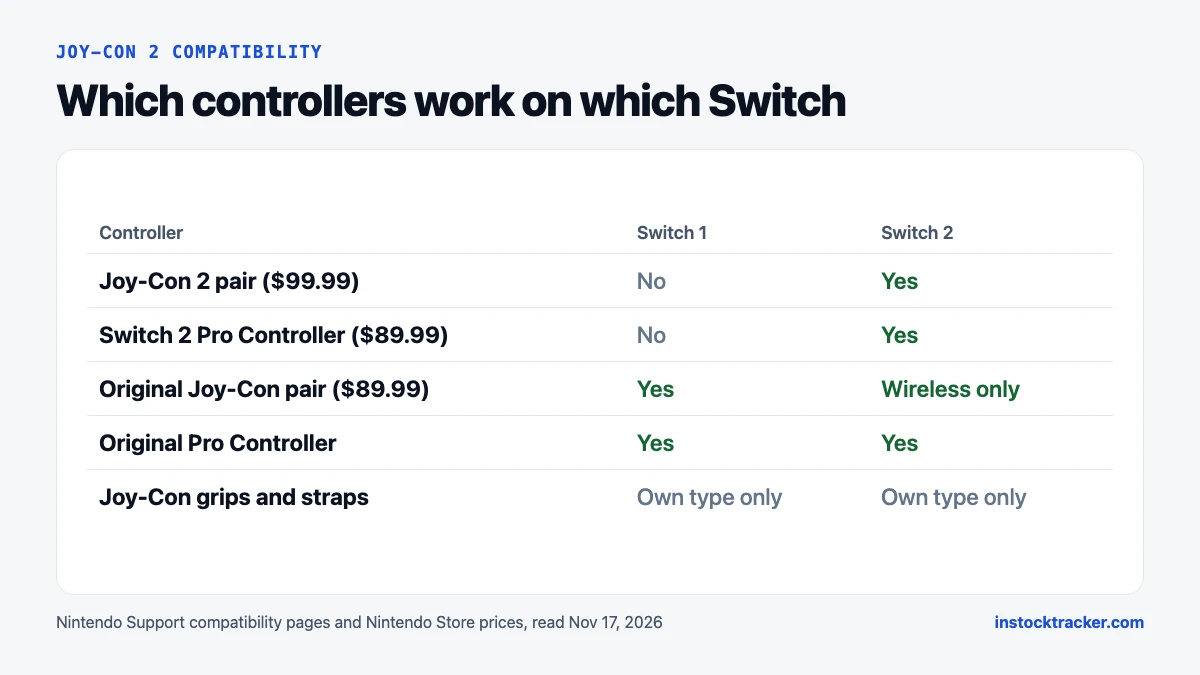
The older ones. Compatibility runs one way: Switch 1 controllers work on a Switch 2, and Switch 2 controllers stay on the Switch 2. Here's how Nintendo's support pages and the Nintendo Store put it:
| Controller | On a Switch 1 | On a Switch 2 | Nintendo Store, Nov 17 |
|---|---|---|---|
| Joy-Con 2 pair | No | Yes, attached or wireless | $99.99, in stock |
| Switch 2 Pro Controller | No | Yes | $89.99, in stock |
| Original Joy-Con pair | Yes | Wireless only, can't attach | $89.99 |
| Original Pro Controller | Yes | Yes | Not priced here |
Nintendo's accessory compatibility table adds a few details. The original Pro Controller can charge from a USB cable plugged into the Switch 2 dock. It also lists the NES, SNES, N64 and Sega Genesis controllers as working on Switch 2 with compatible games.
So if you own both consoles, the controllers to share are the old ones. A Pro Controller you bought in 2018 works on both. A Joy-Con 2 pair you buy today won't. Our Switch 2 Pro Controller vs Switch 1 Pro Controller comparison covers the two Pro pads in detail.
Do original Joy-Con work on Switch 2?
Yes, but only wirelessly. The Joy-Con 2 FAQ says "Joy-Con can be used wirelessly with Nintendo Switch 2." You pair them like any other wireless controller and play with them detached.
Three limits come with that:
- They don't attach. Nintendo lists original Joy-Con as unable to attach to the Switch 2, so you can't use them in handheld mode.
- The Switch 2 doesn't charge them. Nintendo says you need a Switch console or a compatible accessory, such as a Joy-Con charging grip, to charge them.
- Old grips and straps stay with old Joy-Con. Nintendo says each grip "will only work with the correlating controller type." The Joy-Con Strap can't go on a Joy-Con 2.
They also lack the Joy-Con 2's mouse sensor and C button, which Nintendo lists only in the Switch 2 tech specs. Games built around mouse controls need Joy-Con 2. Our Joy-Con 2 vs original Joy-Con comparison goes through every difference.
A Switch 2 pairs up to eight wireless controllers at a time, per the Joy-Con 2 FAQ. Nintendo notes the real number depends on which controllers and features you use.
Do Joy-Con 2 work on PC?
Not officially. Nintendo's pages describe Joy-Con 2 only as Switch 2 controllers, and the Joy-Con 2 FAQ doesn't mention PCs, phones or any other device.
We haven't tested any unofficial way of pairing them with Windows, so we can't recommend one. If you want a Nintendo pad that plays on both a Switch 2 and a PC, our guide to the Switch 2 Pro Controller on PC explains what Steam supports. Otherwise, treat Joy-Con 2 as Switch 2 hardware.
Should you buy Joy-Con 2 if you only have a Switch 1?
No. They won't do anything until you own a Switch 2. If your Switch 1 needs new controllers, buy original Joy-Con. The Nintendo Store lists original pairs at $89.99, though the Pastel Pink / Pastel Yellow pair was out of stock on Nov 17.
If you're upgrading soon, the math changes. Nintendo says each console comes with its own grip, and every Switch 2 box has a Joy-Con 2 pair, as our guide to what comes with the Switch 2 lists. Your old Joy-Con become handy extra controllers for party games on the new console.
A second Joy-Con 2 pair is $99.99 at the Nintendo Store. The Light Purple / Light Green and Light Blue / Light Red pairs were both in stock on Nov 17, and a single Joy-Con 2 (R) in Light Red was $54.99. Stock on Nintendo accessories comes and goes, so you can track Joy-Con 2 and Switch 2 stock and get an alert when a pair returns.
Still choosing a console? The live Switch 2 stock page shows what the Nintendo Store has right now.
Frequently asked questions
Will Joy-Con 2 work on a Switch OLED or Switch Lite?
No. Nintendo says Joy-Con 2 are only for use with the Nintendo Switch 2 console, and they can't connect wirelessly with any Nintendo Switch. The OLED Model and Switch Lite are Nintendo Switch consoles, so the same rule applies. Neither has a magnetic connector for Joy-Con 2 to attach to.
Can I use my old Joy-Con on a Switch 2?
Yes, wirelessly. Nintendo's Joy-Con 2 FAQ says original Joy-Con "can be used wirelessly with Nintendo Switch 2." They can't attach to the console, so handheld mode is out, and the Switch 2 can't charge them. You need a Switch 1 or a Joy-Con charging grip for that.
Does the Switch 2 Pro Controller work on Switch 1?
No. Its Nintendo Store page says "Only for use with the Nintendo Switch 2 system," the same wording as Joy-Con 2. It costs $89.99 and was in stock on Nov 17, 2026. The original Pro Controller is the one that works on both a Switch 1 and a Switch 2.
Do Joy-Con 2 grips fit original Joy-Con?
No. Nintendo says each grip "will only work with the correlating controller type." The two grips differ in size and attachment style, and the Switch 2 grip has a Nintendo Switch 2 logo on the front. Straps don't cross over either: the Joy-Con Strap can't be used with Joy-Con 2.
Sources
- Nintendo Support: Joy-Con 2 FAQ (read Nov 17, 2026)
- Nintendo Support: Differences Between Nintendo Switch 2 and Nintendo Switch Consoles and Accessories (read Nov 17, 2026)
- Nintendo Support: Nintendo Switch and Nintendo Switch 2 Accessory Compatibility (read Nov 17, 2026)
- Nintendo Store: Joy-Con 2 (L)/(R) Light Purple / Light Green (read Nov 17, 2026)
- Nintendo Store: Joy-Con 2 (L)/(R) Light Blue / Light Red (read Nov 17, 2026)
- Nintendo Store: Joy-Con 2 (R) Light Red (read Nov 17, 2026)
- Nintendo Store: Nintendo Switch 2 Pro Controller (read Nov 17, 2026)
- Nintendo Store: Joy-Con (L)/(R) Pastel Pink / Pastel Yellow (read Nov 17, 2026)
- Nintendo Switch 2 tech specs (read Nov 17, 2026)