
 Canada
 United Kingdom
 日本
 الإمارات
Buying Guides
Is Donkey Kong Bananza 2 player? How co-op works
Yes, Donkey Kong Bananza is 2 player. Player 2 rides on DK's shoulder as Pauline or Odd Rock. How to start co-op, controllers, GameShare and GameChat.
Yes, Donkey Kong Bananza is a 2 player game, but player 2 has a support role. One person plays Donkey Kong. The other rides on his shoulder as Odd Rock or Pauline, aiming blasts at rocks and enemies. Co-op unlocks after you rescue Odd Rock, and you can play on one Switch 2 or share it to a second console.
Key Takeaways
- Players: 1 to 2. Nintendo lists "Single system (1-2)."
- Player 2 doesn't control a second Donkey Kong. They ride along as Odd Rock or Pauline and shoot.
- Co-op unlocks once you rescue Odd Rock in the story.
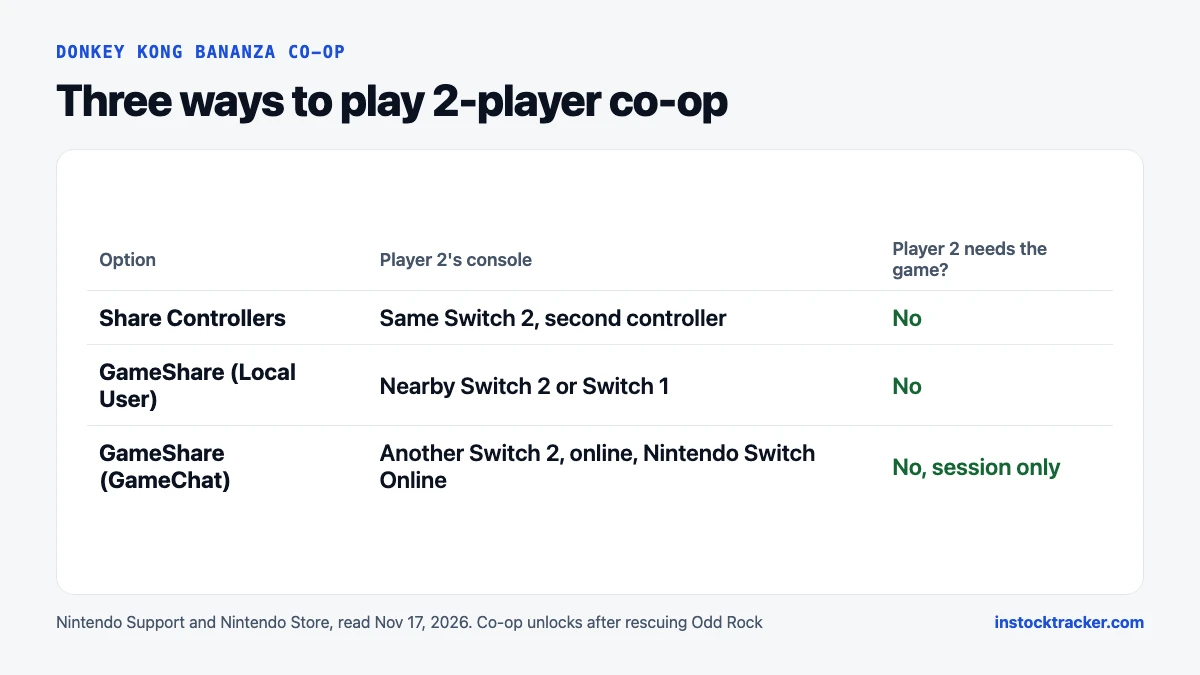
- Three ways to play: share controllers on one Switch 2, GameShare to a nearby Switch 2 or Switch 1, or GameShare over GameChat online.
- Only the host needs the game. GameChat needs a Nintendo Switch Online membership.
How we checked: we read the Nintendo Store's Donkey Kong Bananza pages and Nintendo Support's "How to start a multiplayer game" article on Nov 17, 2026. We followed Nintendo's steps as written and didn't test every controller.
Is Donkey Kong Bananza multiplayer?
Yes, for up to two players. The Nintendo Store's product data lists 1 to 2 players, and the digital listing says "Single system (1-2)." Nintendo doesn't list a mode for three or four.
The co-op is built around one player in charge. Nintendo's store page puts it simply: "In 2-player co-op mode, one player controls Donkey Kong while the other can be Pauline" (Nintendo). Pauline uses her vocal blasts to clear a path and zap enemies.
That suits a parent and a younger child, or a friend who doesn't want to handle the platforming. It suits two players less if both want to run around freely.
What does player 2 do in Donkey Kong Bananza?
Player 2 rides on Donkey Kong's shoulder and attacks. Who they play depends on how far you are in the story. Nintendo Support says player two "controls Odd Rock or Pauline (depending on your story progress)" (Nintendo Support).
So player 1 moves, jumps, climbs and smashes. Player 2 aims and fires. Nintendo describes Pauline as a 13-year-old with a powerful voice, and her singing breaks rocks.
What player 2 can't do:
- Move Donkey Kong or walk away from him
- Play a separate character on a split screen
- Join before you've rescued Odd Rock
Support states the unlock directly: "2-player co-op mode is unlocked after rescuing Odd Rock." If you start a fresh save to play with someone, expect a solo stretch at the start.
How do you start 2-player co-op?
Pause the game and pick Co-op Play. That opens three options. Nintendo's support article lists them, and they compare like this:
| Option | Consoles | What the guest needs | Online? |
|---|---|---|---|
| Share Controllers | One Switch 2 | A second controller | No |
| GameShare (Local User) | Host Switch 2 plus a nearby console | A Switch 2 or Switch 1, no copy of the game | No, local wireless |
| GameShare (GameChat) | Two or more Switch 2 consoles | A Switch 2 in the same GameChat room | Yes |
For the most common setup, one console on the couch:
- Press the + Button to open the Pause Menu.
- Select Co-op Play, then Share Controllers.
- Pair the second controller when asked.
- To go back to solo, open the Pause Menu and pick One Player.
To host GameShare, Nintendo Support says you need a Switch 2 running the latest version of the game. Install any update before your friend comes over.
Which controllers work for player 2?
Any controller you pair through Share Controllers, with one bonus for Joy-Con 2. Nintendo says player two can use Joy-Con 2 mouse controls "for more precise aiming." You slide the Joy-Con 2 on a table like a computer mouse to aim the blasts.
Nintendo only mentions mouse aiming for Joy-Con 2, so don't count on it with other controllers. A GameShare guest uses whatever is paired to their own console.
Nintendo's support page doesn't publish a full controller list for this game, and we won't guess at one. If you're buying a second controller for co-op, a Joy-Con 2 pair gives player 2 the mouse option.
Can you play Donkey Kong Bananza co-op on a Switch 1?
Only as a guest. Donkey Kong Bananza is a Switch 2 exclusive and won't run on the original Switch. But GameShare with a local user lets a nearby Nintendo Switch join a Switch 2 host as player 2. The guest opens GameShare from the HOME Menu, picks Join GameShare, then A Local User.
The online route is different. GameShare over GameChat is for Switch 2 consoles, per Nintendo Support. Our Switch 2 vs Switch OLED guide covers the other differences between the two consoles.
How does GameChat co-op work?
GameChat is the Switch 2's voice and video chat, and it lets you share Bananza with a friend online. Everyone joins a GameChat room first. The host then picks Co-op Play, then GameShare (GameChat), and invites someone. The guest presses the C Button and accepts the invite.
Three rules matter here, all from Nintendo:
- Membership. GameChat needs internet, a Nintendo Account and a Nintendo Switch Online membership, sold separately.
- Text verification. Setting up GameChat requires text message verification on the phone number tied to the Nintendo Account (Nintendo).
- Session only. The Nintendo Store's fine print says a guest who gets the game through GameShare can play it only during the GameChat session where it was shared.
Players under 16 need a parent or guardian to allow GameChat first. Video needs a compatible USB-C camera. Voice doesn't.
Do both players need a copy of the game?
No. Only the host needs Donkey Kong Bananza. Share Controllers runs on one console and one copy. With GameShare, the guest plays the host's shared session without owning the game.
That keeps co-op cheap. One copy is $69.99 at the Nintendo Store, physical or digital, and the physical edition was in stock on Nov 17. If a second Switch 2 is on your holiday list, you can check live Switch 2 stock or set a free Switch 2 restock alert. The game is also $20 off at select shops from Nov 22 to 29 in Nintendo's Black Friday offer.
Frequently asked questions
Is Donkey Kong Bananza split screen?
No. Both players share one screen and one Donkey Kong. Player 1 controls DK, and player 2 rides on his shoulder as Odd Rock or Pauline, aiming attacks. There's no split screen and no second playable Kong. GameShare can send the session to a second console nearby or online.
Can two people play Donkey Kong Bananza online?
Yes, through GameShare over GameChat on Switch 2 consoles. Both players join a GameChat room, then the host shares the game. GameChat needs a Nintendo Switch Online membership and text message verification. The guest doesn't need a copy, but can play only during that session.
When does co-op unlock in Donkey Kong Bananza?
After you rescue Odd Rock. Nintendo Support says "2-player co-op mode is unlocked after rescuing Odd Rock." Until then, the game is single player only, so a fresh save starts solo. Player 2 then joins as Odd Rock, or as Pauline once the story brings her in.
Is Donkey Kong Bananza a good co-op game for kids?
It works well with a younger player in the second seat. Player 2 only aims and fires, so they don't need platforming skills, and Joy-Con 2 mouse controls make aiming easy. It's rated Everyone 10+. Kids who want to steer their own character may find the role limited.
Sources
- Nintendo Store: Donkey Kong Bananza (digital listing, co-op, GameShare and players) (read Nov 17, 2026)
- Nintendo Store: Donkey Kong Bananza, Physical Edition (read Nov 17, 2026)
- Nintendo Support: How to start a multiplayer game (Donkey Kong Bananza) (read Nov 17, 2026)
- Nintendo: GameChat on Nintendo Switch 2 (read Nov 17, 2026)
- Nintendo: "Nintendo announces Black Friday offers to help spread joy this holiday season" (Nov 12, 2026)